Structured View (Web Dashboard)
The structured view is the default rendering for AI coding agents in the web dashboard and the native TUI. Instead of a terminal pane showing the agent’s rendered screen, it renders the agent’s state directly: plan, tool-call cards, diffs, and approvals. It is mobile-first and scales into a multi-pane desktop layout.
It speaks the Agent Client Protocol (ACP), a JSON-RPC standard for editor-agent communication, with aoe as the client and the agent as the server. Any ACP-capable agent uses it by default and can opt into the terminal view per session; agents with no ACP adapter always run in the terminal view.
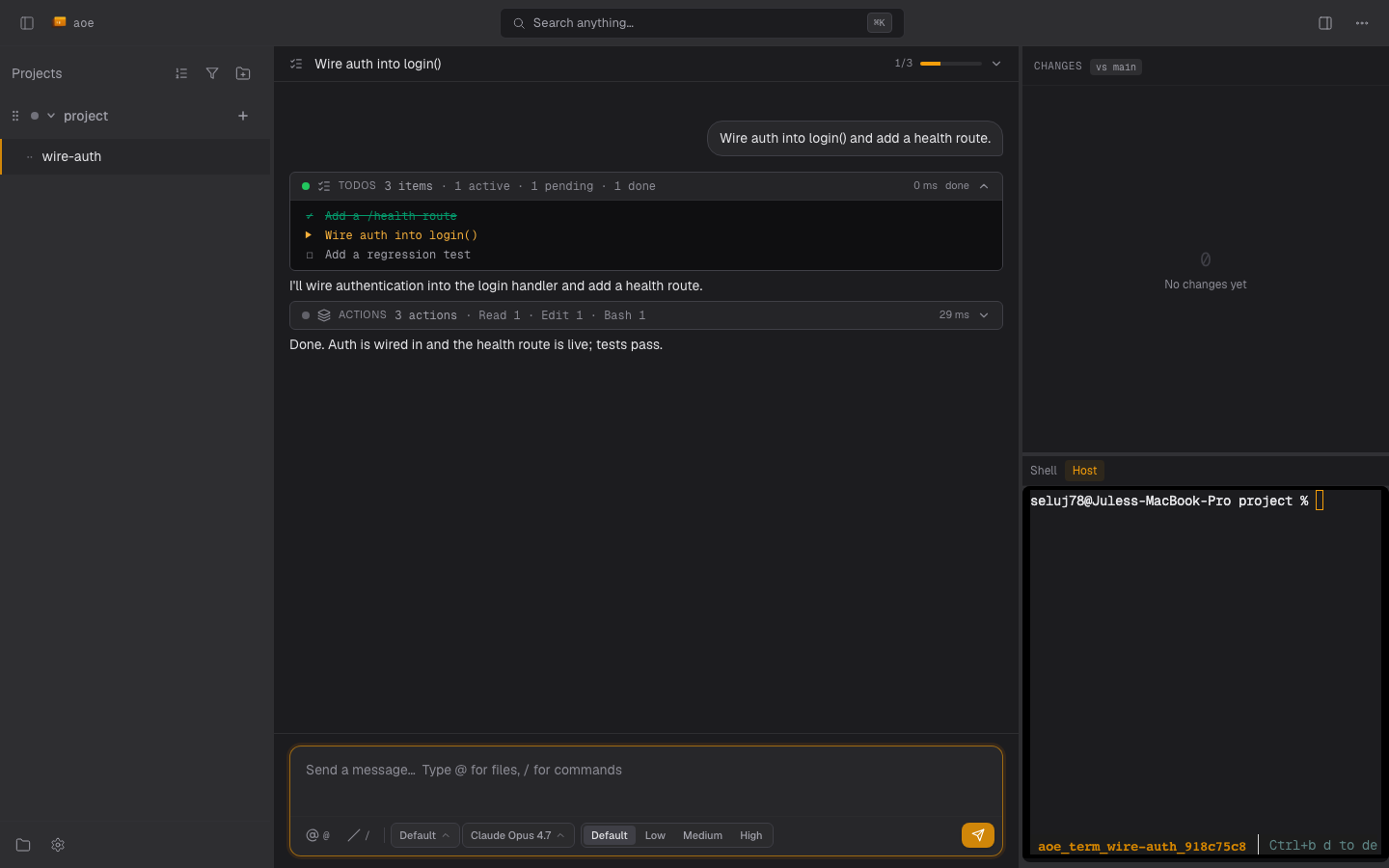
- Interface: surfaces, keybinds, composer, queued prompts, timeline grouping.
- Modes, approvals & model controls: permission modes, approval cards, notifications, model selectors.
- Troubleshooting: the security model and a field guide to each failure mode.
- Contributors: Structured View Internals.
Supported agents
aoe ships an ACP registry entry for each tool whose ACP server we have verified. For those the web wizard shows a per-session Structured switch (on by default).
| Agent | ACP adapter | Install | Auth |
|---|---|---|---|
claude |
claude-agent-acp (Zed) |
npm install -g @agentclientprotocol/claude-agent-acp@latest |
claude login, or ANTHROPIC_API_KEY |
codex |
codex-acp |
npm install -g @agentclientprotocol/codex-acp@latest |
OPENAI_API_KEY, or ChatGPT login (local only) |
opencode |
opencode acp (native, ≥1.16.0 recommended) |
curl -fsSL https://opencode.ai/install | bash |
opencode auth / provider env |
gemini (deprecated) |
gemini --acp (native) |
npm install -g @google/gemini-cli |
GEMINI_API_KEY, OAuth, or Vertex |
vibe |
vibe-acp (native) |
see mistral-vibe | Mistral API key |
pi |
pi-acp |
npm install -g pi-acp (plus @earendil-works/pi-coding-agent) |
pi-acp --terminal-login, or provider env |
omp |
omp acp (native) |
curl -fsSL https://omp.sh/install | sh |
OMP login or provider env |
kimi |
kimi acp (native) |
curl -fsSL https://code.kimi.com/kimi-code/install.sh | bash |
kimi login, or provider env |
prime-agent |
prime-agent --mode acp (native 0.10.x) |
curl -fsSL https://app.primeintellect.ai/prime-agent/install.sh | sh |
/login once, or provider env |
aoe-agent |
bundled (Vercel AI SDK 7) | aoe acp doctor --fix --adapter aoe-agent |
provider env vars |
Gemini CLI is deprecated upstream for individual accounts; enterprise and API-key auth remain valid, and Antigravity CLI is the consumer replacement.
The npm install -g lines are optional: aoe acp doctor --fix installs the claude, codex, and pi adapters and aoe-agent into the data dir instead (see Requirements).
Tools not in the registry (aider, cursor, copilot, droid, hermes, kiro) always run in the terminal view. A custom agent opts in either with an explicit agent_acp_cmd, or by mapping onto a supported base with agent_detect_as, which inherits that base’s adapter; see Configuration.
Provider credentials
Each built-in adapter receives only the provider variables it is known to read, from the environment that runs aoe serve:
| Adapter | Forwarded |
|---|---|
claude |
ANTHROPIC_API_KEY, ANTHROPIC_AUTH_TOKEN, CLAUDE_CODE_OAUTH_TOKEN, CLAUDE_CONFIG_DIR |
codex |
CODEX_API_KEY, OPENAI_API_KEY, OPENAI_BASE_URL, CODEX_HOME |
opencode |
ANTHROPIC_API_KEY, OPENAI_API_KEY, GOOGLE_GENERATIVE_AI_API_KEY, GOOGLE_API_KEY, GEMINI_API_KEY, OPENROUTER_API_KEY, OPENCODE_API_KEY |
gemini |
GEMINI_API_KEY, GOOGLE_API_KEY, GOOGLE_GENAI_USE_VERTEXAI, GOOGLE_APPLICATION_CREDENTIALS, GOOGLE_CLOUD_PROJECT, GOOGLE_CLOUD_LOCATION |
aoe-agent |
ANTHROPIC_API_KEY, OPENAI_API_KEY, OPENAI_BASE_URL, GOOGLE_GENERATIVE_AI_API_KEY |
prime-agent |
PRIME_API_KEY, PRIME_TEAM_ID, every provider key its model registry reads, and the Vertex, Bedrock, and AWS credential-chain variables (see src/acp/agent_registry.rs) |
vibe, pi, omp, kimi, and custom adapters have no ambient allowlist yet: give them auth through the session’s extra_env, the environment list, or session.inherit_host_environment for host sessions. In a sandboxed session the per-adapter keys above still cross the container boundary, but inherit_host_environment does not, so use sandbox.environment there. Allowlist entries naming a file or directory (CLAUDE_CONFIG_DIR, CODEX_HOME, GOOGLE_APPLICATION_CREDENTIALS, the AWS file variables) are host-only and never cross, since each agent’s config dir is already bind-mounted at its canonical container location; each drop is logged under the acp target with the key and the reason.
Prime runtime ownership
Native Prime Agent 0.10.x uses a daemon owned by each structured execution. Ownership follows the resolved ACP backend, including inherited custom agents, rather than the session tool label. The daemon and frontend receive the same effective environment and use the original agent directory for credentials, settings, skills, and history. Sandboxed preparation resolves Prime with the frontend’s executable, environment, working directory, and pinned container ID. AoE does not reuse a daemon launched with another session’s credentials.
Stopping or restarting a session requires process settlement before replacement. Runner retirement is bound to its registry generation, kernel birth identity, and boot. Linux uses pidfds; macOS uses audit-token PID versions. Linux 6.9 and newer can signal the original process group through a retained pidfd after the leader exits. A cold collector without an attested group anchor retains ownership. Foreign-user permission errors do not establish ownership; an uninspectable owned incarnation blocks retirement. Positively scoped native auxiliaries are fenced even if they detached with setsid. Detached runner expiry removes its record and sockets only after cleanup succeeds.
Successful cleanup removes the private runtime directory and retains a compact termination receipt in the AoE worker directory. The receipt binds launch evidence to its original host boot or guest PID namespace. A changed epoch invalidates old descriptors and launch PID files across retries. A missing runtime directory can settle only after the current census proves no owned processes remain. Definitive absence of the pinned container on its recorded runtime endpoint settles that guest’s obligations without signalling host PIDs; stopped, paused, and unreachable containers are not treated as absent. The receipt’s absolute host path is pinned before applying the agent environment, and preparation commits it before launching native processes. Failure rolls back only the directory created by that attempt.
Container images must provide Bash and GNU grep for scoped process inspection, plus Python 3.9 or newer with os.pidfd_open and signal.pidfd_send_signal on the guest kernel. AoE probes pidfd signalling during preparation and binds guest signals to the recorded incarnation, without a numeric PID fallback. Missing capabilities refuse launch. Stopping aoe serve only detaches; an admitted turn continues and the next daemon reattaches to the same worker.
On Apple Container, worker descriptor snapshots are streamed as a tar archive by the guest Python helper. Symlinks and non-regular descriptors are refused; no host copy destination is used.
CLI stop and kill persist a stop intent before signalling. Reattachment, automatic respawn, queued turns, and runner publication respect that fence. Only an explicit resume after settled retirement can clear the stop intent it observed; a newer stop remains authoritative. For a tracked runtime that cannot prove settlement, externally stop only that execution on its original host or pinned container and retry aoe acp stop <id>.
A legacy Prime record without an attested native cleanup route cannot be retired automatically. Upgrades pin an existing control receipt only when it matches the recorded execution route; otherwise the route and ownership record remain intact with an unknown control path. First identify its original host or container and externally stop every native worker and service belonging to that execution. If that scope cannot be identified or its shutdown cannot be confirmed, retain the record. Do not use a global Prime shutdown that would affect unrelated executions.
After confirming native shutdown and verifying the original runner has exited, run aoe acp recover <id> --confirm-prime-stopped on the original worker host. The flag is an operator attestation, not proof obtained by AoE. Recovery refuses live original runners, attested native routes, non-Prime records, and changed execution identities. It retires only the selected record and runner sockets, not conversation history.
Malformed registry bytes remain an admission fence. After externally stopping the original runner and all its host or container native processes, use aoe acp recover <id> --confirm-worker-stopped. This covers unattested legacy runners and orphaned runner groups after external settlement. Recovery observes rather than signals: a known runner or group still executing, a live control-socket peer, changed evidence, or failed cleanup of an attested native route prevents retirement. Unidentified native receipts remain intact. If the original scope cannot be identified and stopped, retain the record rather than discarding it.
Prime 0.10.0 does not advertise ACP session/load: reattachment preserves a live session, but a cold ACP start creates a new native context and reports a context reset.
Switching provider
A Claude session can be moved between the direct API, Bedrock, and Vertex without losing its transcript, from the provider picker next to the model picker or with aoe acp switch-provider <session> <api|bedrock|vertex>.
The pick only sets CLAUDE_CODE_USE_BEDROCK and CLAUDE_CODE_USE_VERTEX, and it outranks both the host environment and the environment list. Credentials are not provisioned by it: the target provider’s own variables (ANTHROPIC_VERTEX_PROJECT_ID and CLOUD_ML_REGION for Vertex, the AWS credential chain for Bedrock) must already be present where aoe serve runs, or the next turn fails on authentication.
Two further effects are worth knowing before you switch:
- The model is reset to the new provider’s default, because model ids differ between providers and a resumed conversation would otherwise stay on the model it last ran. Pick a model again afterwards if you had one pinned.
- A sandboxed session’s container is recreated, since the GCP credential mount is decided when the container is built. Anything written inside the container but outside the workspace volume is lost.
The switch is refused while a turn or a background agent is running, since it restarts the worker. Once idle, the worker restarts and resumes the same conversation.
Feature matrix
| Feature | Claude | Codex | OpenCode | Gemini | Other ACP |
|---|---|---|---|---|---|
| Streaming text, tool-call cards, approvals | ✓ | ✓ | ✓ | ✓ | ✓ |
| Mode picker | ✓ | depends | ✓ | depends | depends |
| Slash-command palette | ✓ | depends | ✓ | ✓ | depends |
| Usage / context-window display | ✓ | depends | ✓ | ✓ | depends |
/clear boundary divider |
/clear |
/new |
/new |
none | none |
| TodoWrite / Skill / ExitPlanMode / ScheduleWakeup cards | ✓ | — | — | — | — |
| Subagent indentation | ✓ | — | unverified | — | — |
Session resume across aoe serve restart |
✓ | depends | ✓ | depends | depends |
“Depends” means the adapter has to advertise the matching channel; when it does not, the UI stays empty rather than showing stale state. Codex does not advertise a Plan-mode channel, so no Codex Plan switch is rendered. Older opencode falls back to generic tool cards, verbose read text, and blind permission prompts. If a tool renders as a generic card, file an issue with the observed tool.kind and tool.name; how profiles gate these is covered in Structured View Internals.
Quickstart
- Run
aoe serveand open the dashboard. - Click New session, pick your project and agent, and launch. Structured view is on by default.
- Open the session: you get the plan and tool-call cards instead of a terminal.
The CLI is the optional path for scripting. Unlike the wizard, aoe add defaults to the terminal view:
aoe acp doctor                              # confirm prerequisites
aoe add . --cmd claude --structured-view    # structured view for an ACP tool
aoe add . --agent codex --model gpt-5       # pick an ACP agent + model (implies structured view)
aoe add . --agent codex --effort high       # pick the reasoning effort
--agent for an uninstalled adapter errors with an install hint; --structured-view without --agent falls back to the terminal view with a warning, so the command still succeeds.
Requirements
- Node.js 22+ on
PATH(the structured view spawns the adapter as a subprocess);aoe-agentneeds 22.6+. - For Claude Code, a
claude loginsession.
If Node is missing or too old, the session falls back to the terminal view with an actionable warning. Verify with aoe acp doctor:
aoe acp doctor                            # Node + each configured agent's reachability
aoe acp doctor --fix                      # bundled Node if missing, then claude-agent-acp
aoe acp doctor --fix --adapter codex-acp  # a specific adapter
aoe acp doctor --fix --all-adapters       # every bundled adapter
--fix installs a pinned npm adapter under $AOE_DATA_DIR/acp-worker/adapters/<adapter>/ with the bundled Node’s own npm: no npm install -g, no sudo. Each adapter is a separate several-hundred-MB tree (pi-acp is the exception at ~7 MB), so --fix installs only claude-agent-acp unless you ask for more. An adapter already on your PATH normally wins, unless it is below the version floor aoe requires, in which case aoe uses the pinned copy and logs the substitution. doctor exits 1 if Node is missing, 2 if some agents are unreachable, else 0; --json for machine-readable output. Install the native CLIs through their own channels.
Choosing the view per session
- Web wizard: structured view by default (set
acp.default_new_session_viewto change it); turn off Use structured view for the terminal. - CLI / TUI: terminal view by default; opt in with
--structured-viewor--agent, or the Structured field in the TUI new-session dialog. - An existing session can switch either way from the web sidebar’s right-click menu or the TUI context menu (which needs a running
aoe serve). Both confirm first, and the worktree, files, and commits are always preserved. For a claude session, the conversation is kept in both directions only when AoE can resolve a shared native store. A terminal switch whose store cannot be resolved, or which the structured worker does not share, is refused with HTTP 409 andset-session-id --storerecovery guidance. Every other agent starts fresh on the target surface.
Launch command and session naming
--cmd <tool> resolves through session.agent_command_override like a terminal session, so an override makes --cmd opencode launch opencode-plannotator acp with the required ACP args preserved. Adapter-backed agents such as Claude use session.agent_acp_cmd for a full command swap. The wizard shows the resolved command read-only.
aoe add names a session from --title, else the worktree branch, else a generated name (-i prompts like the TUI and wizard do). A structured session still carrying a generated name is auto-renamed once its first turn finishes, by a one-shot call to the session’s own agent, so the title reflects both your prompt and the response. See session.smart_rename in the configuration reference.
If the rename never lands, right-click the session and pick Auto-name now (TUI: v or the command palette), which works even with smart_rename off and regenerates the title even over one you picked yourself (the automatic rename never does). If the agent’s one-shot fails (for example an expired login or an unsupported model), its error is shown instead of a new title. The sidebar shows an Auto-name chip while a session is still default-named and a Naming… chip while the call is in flight. Two more chips flag a session that parked itself but is still alive: a ⏰ countdown to a scheduled wakeup, and a 👁 monitoring badge while an armed Monitor keeps re-invoking the agent, which clears when you send a new prompt.
Per-agent startup defaults live under [acp.acp_defaults.<agent>] (model, effort, mode, effort_by_model, pin_model) and are editable from the web settings; see Configuration. The rest of [acp] is in Structured View Internals.
Agent artifacts
Each session gets a managed artifact directory, exposed as AOE_ARTIFACT_DIR (bind-mounted at /aoe/artifacts in a sandbox). Files the agent writes there are served over an authenticated, session-scoped route: transcript links open them in a new tab and markdown images render inline. Files written anywhere else render as plain text, so write anything you want viewable under $AOE_ARTIFACT_DIR.
Cross-machine attach
Point AOE_DAEMON_URL (and optionally AOE_DAEMON_TOKEN) at a remote aoe serve:
AOE_DAEMON_URL=https://aoe.example.com AOE_DAEMON_TOKEN=… aoe   # remote session picker
aoe acp attach <session_id> --daemon-url https://aoe.example.com
With AOE_DAEMON_URL set, the TUI opens a remote session picker; aoe serve --status, daemon-backed aoe acp verbs and the read-only CLI commands select that daemon. Local operations such as tmux attach, aoe stop, file editing and worker recovery still require the local machine or SSH. The TUI picker sends bearer tokens only over HTTPS or loopback. Runtime CLI reads permit non-loopback HTTP without credentials; remote authentication requires HTTPS, and localhost is pinned to loopback without DNS. See runtime CLI reads for endpoint selection and fallback rules.
For runtime reads and ACP requests to a daemon running --auth=passphrase, use AOE_DAEMON_PASSPHRASE instead of a bearer token. These clients share the /api/login handshake, device binding, and persisted session cache. Login secrets never follow redirects; loopback login bypasses environment proxies. ACP local discovery can also read the saved serve.passphrase file. A revoked cached session triggers a fresh login; a failed authentication never substitutes local rows. TUI session-list authentication supports bearer tokens only; an unauthenticated daemon needs no credential. Ancillary plugin UI requests can use passphrase authentication through the ACP client.
Headless CLI verbs
Every structured-view operation has a matching verb against the same daemon:
| Verb | What it does |
|---|---|
aoe acp history <id> |
Dump the persisted transcript |
aoe acp status <id> |
Print highest/lowest seq and the daemon source |
aoe acp prompt <id> <text> |
Send a prompt (- reads stdin) |
aoe acp approve <id> <nonce> [--always|--deny|--option <id>] |
Resolve a pending approval |
aoe acp cancel <id> |
Cancel the in-flight prompt |
aoe acp set-option <id> <config_id> <value> |
Set a model, mode or effort option on a running session |
aoe acp tail <id> |
Stream broadcast frames as JSON lines |
aoe acp attach <id> |
Open the TUI structured view |
aoe acp stop / kill / restart / logs / switch-agent |
Worker management |
aoe acp recover <id> --confirm-prime-stopped |
Retire an identifiable missing-route Prime record after operator-confirmed native shutdown |
aoe acp recover <id> --confirm-worker-stopped |
Retire malformed or unattested legacy ownership after external shutdown confirmation |
aoe ps --acp |
List workers with their ACP columns; --dead includes dead and orphaned ones |
Daemon-backed verbs need a running aoe serve and exit with a hint if none is found. The CLI never spawns a daemon on your behalf. Recovery operates on the local worker registry, so run it on the original worker host, using SSH for a remote host.